Most tools in the “AI for sales” category promise better emails. Clay starts earlier in the funnel and solves a harder problem. It focuses on the quality of the data and the workflow that produces that data. That shift changes how teams source leads, qualify them, and prepare them for outreach.
If you approach Clay like a lead database or a cold email tool, it feels confusing. If you evaluate it as a system for building and managing go-to-market workflows, the product starts to click.
This Clay AI review breaks the platform down from that lens. What it actually is, how it works in practice, where it delivers real value, and where it introduces complexity that most teams underestimate.
Table of Contents
Key Takeaways
- Clay is a GTM data and workflow engine, not a traditional lead database
- Its real strength lies in enrichment, research, and workflow automation
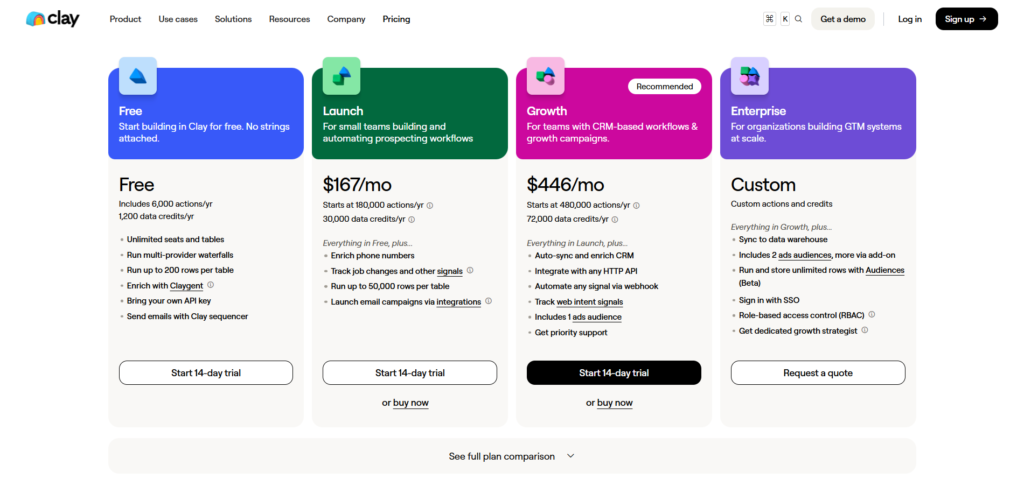
- Pricing is driven by usage and workflow complexity, not just subscription tiers
- It works best for outbound teams that care about signal quality
- The learning curve is real, and results depend on how well workflows are designed
What Clay Actually Is
Clay is often described in broad terms like “AI sales tool” or “lead generation platform.” Those labels flatten what the product actually does. The easiest way to understand Clay is by defining what it is not.
Not a Lead Database
Clay does not behave like a traditional database such as Apollo or ZoomInfo where you search and export lists from a fixed dataset.
Instead, Clay sits on top of multiple data providers and APIs. You bring in leads from different sources, and Clay enriches them by pulling additional information from those providers.
That distinction matters. You are not just buying access to a list. You are building a pipeline that continuously improves the quality of your data.
Not a Full Sales Engagement Platform
Clay is not designed to replace tools like Instantly, Smartlead, or HubSpot sequences.
You can push data out of Clay into outbound tools. You can even trigger certain actions. But Clay is strongest before the first email is sent.
It prepares the data. It does not own the entire engagement lifecycle.
What It Actually Is
The most accurate way to think about Clay is this:
A GTM data and workflow engine that helps you:
- source leads
- enrich them with high-quality data
- research and qualify them
- score and segment them
- route them into outbound systems
That framing explains both its power and its complexity.
How Clay Works in a Real Go-To-Market Workflow
Most reviews list features. Very few explain how a team actually uses Clay from start to finish. This is where the product becomes clearer.
Lead Sourcing and Prospect Discovery
Clay can ingest leads from multiple sources:
- LinkedIn searches
- CSV uploads
- APIs and integrations
- internal databases
You are not locked into a single source. You define the starting point based on your workflow.
This flexibility is one of Clay’s strengths. It also means the quality of your input still matters.
Waterfall Enrichment Across Providers
This is one of Clay’s core mechanisms.
Instead of relying on a single data provider, Clay allows you to:
- query multiple enrichment tools
- fall back from one provider to another
- combine results into a unified dataset
For example, if one provider fails to return a verified email, Clay can automatically try another.
This “waterfall enrichment” approach increases hit rates and improves data reliability. It also introduces cost complexity, because each lookup consumes credits.
AI Research with Claygent
Claygent is Clay’s AI research layer. It goes beyond structured fields like name, email, and company.
It can:
- summarize company information
- extract context from websites
- identify signals like hiring trends or product focus
- generate custom research outputs
This is where Clay starts to feel less like a data tool and more like a research assistant embedded into your workflow.
The real value comes when you define what “useful context” means for your specific use case.
Scoring, Qualification, and Routing
Once data is enriched, Clay allows you to:
- define scoring rules
- segment leads based on conditions
- filter out low-quality prospects
You can create logic such as:
- only include companies above a certain size
- prioritize leads in specific industries
- flag accounts with certain behavioral signals
This transforms a raw list into a usable, prioritized pipeline.
Sending or Syncing to Outreach Tools
Clay does not need to send emails itself to be valuable.
Instead, it connects to outbound tools and CRMs:
- push leads into Instantly or Smartlead
- sync with HubSpot or Salesforce
- export structured data for campaigns
At this stage, Clay hands off to tools that specialize in execution.
This separation of roles is intentional. Clay focuses on signal quality. Other tools handle delivery and engagement.
Where Clay Stands Out
Clay’s strengths become clearer when you evaluate it against the problems teams actually face in outbound.
Access to Multiple Data Sources in One Place
Instead of subscribing to multiple tools and stitching them together manually, Clay centralizes access.
You can:
- enrich leads with multiple providers
- combine datasets
- avoid switching between tools
This reduces operational friction, especially for teams running high-volume prospecting.
Workflow Flexibility
Clay behaves more like a programmable system than a fixed tool.
You can:
- design custom enrichment pipelines
- define conditional logic
- build repeatable workflows
This flexibility allows advanced teams to create highly tailored GTM processes.
The tradeoff is that you need to understand what you are building.
AI Research and Custom Data Points
Claygent allows you to create data that does not exist in standard databases.
For example:
- summarizing a company’s product positioning
- identifying recent strategic changes
- extracting insights from public information
This is especially useful for personalization and qualification.
Strong Fit for Signal-Driven Teams
Clay is particularly effective for teams that care about:
- data quality
- targeting precision
- workflow efficiency
It is less about sending more emails and more about sending better-targeted ones.
Where Clay Is Harder Than It Looks
The same factors that make Clay powerful also introduce friction.
The Learning Curve Is Real
Clay is not a plug-and-play tool.
You need to:
- understand how data flows through the system
- design workflows intentionally
- manage enrichment steps and logic
Teams that expect instant results often struggle early.
Pricing Gets Complicated Quickly
Clay uses a combination of:
- credits
- actions
- enrichment costs
Each lookup, API call, or enrichment step can consume credits.
The result is that cost is not linear. It depends on how you structure your workflows.
Two teams on the same plan can have very different costs.
Easy to Overbuild
Clay gives you a lot of control.
That control can lead to:
- overly complex workflows
- unnecessary enrichment steps
- wasted credits
Teams sometimes build systems that are more sophisticated than their actual needs.
Depends on Workflow Design
Clay is not a magic layer.
The output quality depends on:
- how you define your inputs
- how you structure enrichment
- how you set scoring rules
Poor workflow design leads to poor results, regardless of the tool.
Clay Pricing: What You’re Really Paying For
Pricing is one of the most misunderstood aspects of Clay.
Entry Point and Free Plan
Clay offers a free tier with limited credits and actions.
This is useful for:
- testing workflows
- understanding the interface
- validating use cases
But it does not reflect real production usage.
Credits and Actions
Clay’s pricing revolves around:
- data credits for enrichment
- actions for workflow execution
Every step in your workflow has a cost.
This creates a system where usage scales with complexity.
Why Cost Feels Nonlinear
Unlike traditional SaaS pricing, Clay’s cost is not fixed per user or per month.
It depends on:
- number of leads processed
- number of enrichment steps
- data providers used
This makes budgeting harder, especially early on.
Cost Per Usable Lead
The most practical way to evaluate Clay is not by subscription cost, but by outcome.
Ask:
- how many leads become usable
- how much each usable lead costs
- how much revenue each lead can generate
For teams with high-value deals, Clay’s cost structure often makes sense.
For low-value use cases, it may not.
Who Will Find It Worth It
Clay’s pricing works best for:
- outbound-driven SaaS companies
- agencies running lead generation
- RevOps and sales ops teams
These users can justify the cost through improved conversion rates and efficiency.
Who Clay Is Best For
Fit determines whether Clay feels like leverage or overhead.
Strong Fit
Clay works well for:
- outbound sales teams
- agencies managing prospecting workflows
- RevOps teams optimizing data pipelines
- founders running targeted outbound
These users benefit directly from improved data quality and workflow control.
Weak Fit
Clay is not ideal for:
- beginners looking for simple lead generation
- teams that need a CRM first
- teams focused on email marketing rather than outbound
- users who want plug-and-play simplicity
In these cases, simpler tools often perform better.
Clay vs the Alternatives
Clay often gets compared to tools that operate in adjacent categories. These comparisons clarify its role.
Clay vs Apollo
Apollo provides:
- a built-in database
- outreach capabilities
- simpler workflows
Clay provides:
- multi-source enrichment
- customizable workflows
- deeper data control
Apollo is easier to start with. Clay offers more flexibility for advanced use cases.
Clay vs ZoomInfo
ZoomInfo is a large, proprietary data provider.
Clay:
- aggregates multiple providers
- allows fallback logic
- builds custom workflows
ZoomInfo offers depth in a single dataset. Clay offers breadth and flexibility across sources.
Clay vs Instantly or Smartlead
Instantly and Smartlead focus on:
- sending emails
- managing deliverability
- running campaigns
Clay focuses on:
- preparing data
- enriching leads
- qualifying prospects
They complement each other rather than compete directly.
Clay vs HubSpot
HubSpot is a CRM and marketing platform.
Clay is:
- not a CRM
- not a full marketing system
Instead, Clay feeds high-quality data into systems like HubSpot.
The Final Verdict on Clay
Clay is not an entry-level tool. It is a system for teams that have already experienced the limitations of basic prospecting tools.
When Clay Is a Great Buy
Clay makes sense when:
- data quality is a bottleneck
- targeting precision matters
- outbound is a core growth channel
- workflows need to scale
In these cases, Clay becomes a force multiplier.
When It Is Overkill
Clay is unnecessary when:
- your outbound volume is low
- your targeting is simple
- your team lacks the bandwidth to manage workflows
In these scenarios, simpler tools are often more effective.
The One-Sentence Verdict
Clay is best understood as infrastructure for building high-quality outbound pipelines, not as a tool for sending emails.
Frequently Asked Questions (FAQs)
What does Clay actually do?
Clay helps teams source, enrich, research, and qualify leads before pushing them into outbound or CRM systems.
Is Clay a CRM?
No. Clay does not manage customer relationships or pipelines in the way a CRM does.
Is Clay better than Apollo?
They serve different purposes. Apollo is simpler and includes a built-in database. Clay offers more flexibility and deeper workflow control.
How much does Clay cost?
Clay uses a credit-based system. Actual cost depends on how many leads you process and how complex your workflows are.
Is Clay good for small teams?
It can be, but only if the team is willing to invest time in learning and designing workflows.
Does Clay send emails?
Clay can connect to outbound tools, but it is not primarily designed as an email sending platform.